The cordless gaming mouse has rapidly evolved from a niche curiosity into the preferred weapon of choice for competitive and casual gamers alike. Freed from the tangle and drag of cables, wireless mice now deliver performance that rivals or even surpasses their wired counterparts. Yet this freedom comes with a new challenge: navigating a dense landscape of technical specifications that can overwhelm even the most tech-savvy gamer. Terms like DPI, polling rate, and switch durability appear on every product page, but understanding what they actually mean for your gameplay is another matter entirely. This article cuts through the marketing noise to break down the key features that truly define a top cordless gaming mouse. By examining sensor precision, responsiveness, build quality, and ergonomic design, you’ll gain the knowledge needed to make confident, informed purchasing decisions. When you understand how each specification translates to in-game performance, you stop guessing and start choosing gear that genuinely elevates your play.
Beyond the Cord: Essential Gaming Mouse Features Explained
The transition from wired to cordless gaming mice represents more than just cutting a cable—it fundamentally changes how gamers interact with their setup. Without physical drag or snag points, a cordless mouse allows fluid, unrestricted movement across your mousepad. But this freedom only matters if the underlying gaming mouse features deliver the performance your playstyle demands. The core specifications that separate a mediocre wireless mouse from an exceptional one include sensor technology, weight distribution, polling rate, DPI range, switch quality, and ergonomic design. Each of these features caters to different gaming styles in distinct ways. An FPS player needs pinpoint tracking accuracy and a lightweight shell for quick flicks, while an MMO enthusiast prioritizes additional programmable buttons and comfortable ergonomics for marathon sessions. Strategy gamers might value precise DPI control for managing both sweeping camera movements and pixel-perfect unit selections. Understanding these specs isn’t about chasing the highest numbers on a spec sheet—it’s about identifying which combination of features aligns with your specific needs. When you grasp how sensor accuracy, responsiveness, and build quality work together, you move beyond marketing hype and toward genuinely informed purchases that improve your gameplay.
Sensor Technology: The Heart of Precision
Modern cordless gaming mice primarily use optical or laser sensors, each with distinct characteristics. Optical sensors track surface movement using LED illumination and excel on cloth mousepads, offering consistent accuracy without acceleration or jitter. Laser sensors can function on more surface types, including glass, but historically introduced slight acceleration that competitive players found undesirable. Today’s top-tier optical sensors deliver flawless tracking with zero smoothing or prediction, making them the gold standard for competitive gaming. When evaluating sensor specs, tech-savvy gamers should look beyond maximum DPI claims and focus on tracking consistency, lift-off distance adjustability, and whether the sensor introduces any inherent acceleration.



Ergonomics and Design: Comfort for Long Sessions
Your grip style—palm, claw, or fingertip—should dictate the mouse shape you choose. Palm grip users benefit from larger, contoured shells that support the entire hand, while fingertip grip players prefer smaller, lighter designs that allow rapid repositioning. Button placement matters equally; side buttons should fall naturally under your thumb without requiring awkward stretches. Many top cordless mice offer customizable elements like swappable side panels, adjustable weight systems, and removable magnetic button covers. These design choices directly affect your gaming style, determining how quickly you can access secondary functions and how long you can play before fatigue sets in.
DPI Settings: Mastering Sensitivity for Competitive Edge
DPI, or Dots Per Inch, measures how far your cursor travels on screen relative to physical mouse movement. A mouse set to 800 DPI moves the cursor 800 pixels for every inch you slide it across your pad, while 1600 DPI doubles that on-screen distance for the same physical motion. This single specification fundamentally shapes how your aim feels in every game you play. Higher DPI settings allow rapid cursor movement with minimal hand effort, which suits fast-paced genres requiring sweeping camera rotations. Lower DPI settings demand more physical movement but reward you with finer precision—critical when lining up headshots or selecting small interface elements.
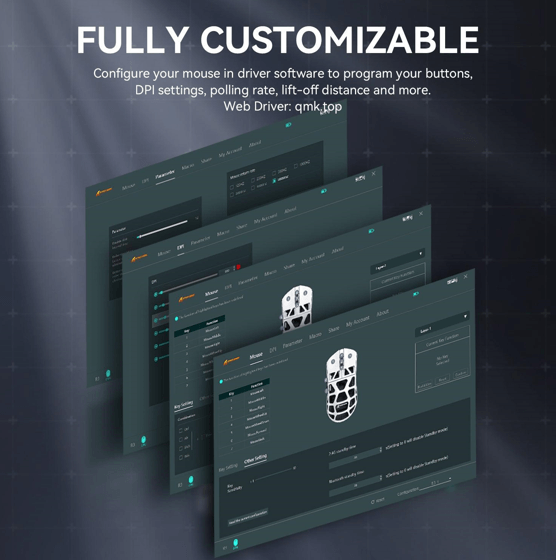
Modern cordless gaming mice offer adjustable DPI levels, typically ranging from 100 to 25,000 or beyond, with dedicated buttons for on-the-fly switching between presets. This flexibility lets you drop to a low sensitivity when sniping, then instantly jump to a higher setting for navigating menus or piloting vehicles. The key is understanding that raw DPI numbers mean nothing without context. A 25,000 DPI ceiling sounds impressive but becomes unusable for most players at maximum settings. What matters is finding your optimal range and having granular control within it. To dial in your ideal sensitivity, start by setting a moderate DPI around 800-1200, then play your primary game for several sessions. Gradually adjust in small increments—50 to 100 DPI at a time—until your crosshair movement feels instinctive rather than forced. Pay attention to whether you’re overshooting targets or falling short, and let that feedback guide your adjustments rather than copying a professional player’s settings blindly.
How to Calibrate DPI for Different Game Types
For FPS titles, begin around 400-800 DPI paired with low in-game sensitivity to maximize aiming precision during tracking and flick shots. Strategy and MOBA players benefit from 1000-1600 DPI, balancing quick map navigation with accurate unit selection. Use your mouse’s companion software to create game-specific profiles that automatically switch DPI presets when launching different titles, eliminating the need for manual adjustment between sessions.
Polling Rate: Achieving Lag-Free Responsiveness
Polling rate, measured in Hertz (Hz), defines how frequently your cordless gaming mouse reports its position to your computer. A mouse operating at 500Hz sends position updates 500 times per second, translating to a 2-millisecond delay between each report. Bump that to 1000Hz, and reports arrive every millisecond—halving the potential input lag. For competitive gamers, this difference isn’t trivial. In fast-paced shooters where milliseconds determine whether your shot lands first, a higher polling rate ensures your physical movements translate to on-screen actions with minimal perceptible delay. The cursor path also appears smoother at higher rates because the system receives more data points to reconstruct your intended movement arc.
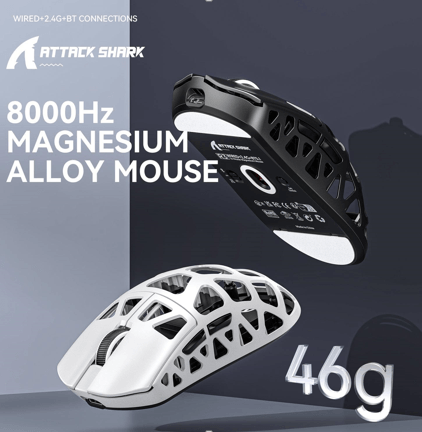
Most serious gaming mice offer 1000Hz as a standard, with some newer models from brands like ATTACK SHARK pushing to 2000Hz or even 4000Hz. However, the practical benefit diminishes beyond 1000Hz for the majority of players, as the difference between 1ms and 0.25ms response time falls below human perception thresholds in most scenarios. The more pressing consideration for cordless mice is how polling rate affects battery consumption. Every position report requires the wireless transmitter to communicate with the receiver, and more frequent transmissions drain power faster. This creates a genuine trade-off that wired mice never face. When selecting your optimal polling rate, consider your gaming context honestly. If you compete in ranked FPS matches, 1000Hz is non-negotiable. For casual sessions or genres where split-second reactions matter less, dropping to 500Hz can meaningfully extend battery life without noticeably degrading your experience.
Balancing Polling Rate with Battery Efficiency
Running a cordless mouse at maximum polling rate can reduce battery life by 30-50% compared to lower settings. Most companion software allows you to create profiles that automatically adjust polling rate based on application—full 1000Hz during games, reduced to 125Hz or 250Hz when browsing or working. This approach preserves responsiveness when it counts while extending charge cycles significantly, letting you game longer between charges without compromising competitive performance.
See also: Why Bus Accidents Can Cause Serious Injuries
Switch Durability: Ensuring Long-Term Reliability
The switches beneath your mouse buttons endure extraordinary punishment during gaming sessions—rapid-fire clicking in shooters, constant ability activation in MOBAs, and sustained macro execution in MMOs can accumulate thousands of clicks per hour. Switch durability determines how long your cordless gaming mouse maintains its crisp, responsive feel before developing double-clicking issues, mushy feedback, or outright failure. Manufacturers rate switches in millions of clicks, with current options ranging from 20 million to 100 million click lifecycles depending on the switch type and construction quality.
Two primary switch technologies dominate the market: mechanical and optical. Traditional mechanical switches use metal contact leaves that physically touch to register a click. They offer satisfying tactile feedback and proven reliability, but the metal contacts eventually degrade through oxidation and wear, potentially causing the dreaded double-click problem where a single press registers twice. Optical switches solve this by using an infrared light beam that breaks when you press the button—no physical contact means no debounce delay and virtually no degradation over time. This makes optical switches inherently more durable and consistent across their lifespan, though some gamers prefer the distinct tactile character of mechanical alternatives. Beyond raw longevity numbers, consider click feel and actuation force. Lighter actuation suits rapid clicking but increases accidental input risk, while heavier switches provide deliberate feedback at the cost of finger fatigue during extended sessions. The best approach is matching switch characteristics to your primary genre—lighter, faster switches for click-intensive games and firmer options for titles demanding precision over speed.
Evaluating Switch Quality in Product Reviews
When researching switches, look beyond manufacturer claims and examine real-world user feedback after six to twelve months of ownership. Reviews mentioning double-clicking issues within the first year signal poor switch implementation regardless of rated lifespan. Check whether the manufacturer offers warranty coverage specifically for switch failure, and verify if the mouse design allows switch replacement—some enthusiast-grade mice feature hot-swappable sockets that let you install fresh switches yourself, dramatically extending the product’s useful life.
Putting It All Together: Your Step-by-Step Guide to Choosing the Perfect Cordless Gaming Mouse
Now that you understand how DPI settings, polling rate, and switch durability each contribute to performance, the real challenge is combining this knowledge into a coherent purchasing strategy. These features don’t exist in isolation—they interrelate in ways that compound or compromise your experience. A mouse with exceptional sensor precision becomes frustrating if its shape causes hand cramps after thirty minutes. Blazing-fast polling rates mean nothing if the battery dies mid-match. The goal is finding harmony between technical specifications and your personal requirements.
Start by honestly assessing your gaming style and preferences. Identify the genres you play most frequently and the physical movements they demand. Next, prioritize features based on those genres—if you primarily play competitive shooters, sensor accuracy and polling rate take precedence over button count. For MMO or strategy players, ergonomic comfort and programmable inputs deserve top billing. Third, compare specifications across reputable brands, focusing not on headline numbers but on the metrics that matter for your use case. Fourth, test ergonomics and customization options whenever possible—watch grip-style demonstrations, read shape comparisons, and if feasible, try mice in person before committing. Finally, factor in battery life and software ecosystem support. A mouse that requires daily charging disrupts your routine, and companion software that feels clunky discourages you from fine-tuning profiles. Balance technical excellence with practical livability, and you’ll land on a cordless gaming mouse that feels like a natural extension of your intent rather than a compromise.
Example Scenario: Choosing for an FPS Gamer
An FPS player should target a lightweight cordless mouse with a flawless optical sensor set between 400-800 DPI, a 1000Hz polling rate for minimal input lag, and optical switches rated for high-click durability to withstand intense firefights. This combination ensures precise flick aiming, instantaneous response, and reliable performance through thousands of hours of competitive play.
Matching Specs to Your Playstyle for the Ultimate Wireless Experience
Choosing a top cordless gaming mouse comes down to understanding how a handful of critical features work together to shape your experience. DPI settings determine the relationship between your physical movements and on-screen precision, giving you the sensitivity control needed to excel across different genres. Polling rate governs how responsively your mouse communicates with your system, ensuring that every flick and micro-adjustment registers without perceptible delay. Switch durability dictates how long your mouse maintains its reliable, crisp performance before wear compromises your clicks. And underlying all of these technical specs, ergonomic design and build quality determine whether you can actually leverage those numbers comfortably during extended play sessions. Armed with this knowledge, you’re no longer at the mercy of flashy marketing claims or inflated specification numbers. You can evaluate each cordless gaming mouse on the metrics that genuinely matter for your playstyle, budget, and comfort requirements. Take the time to research, compare real-world reviews, and test options when possible. The right cordless gaming mouse isn’t the one with the highest specs across the board—it’s the one whose features align precisely with how you play, keeping you comfortable, responsive, and competitive for years to come.