IPTV Player Mac
Best IPTV Player for Mac: Top Apps in 2026
Streaming content has completely transformed how we watch TV and Mac users are no longer limited when it comes to IPTV solutions. Finding the right IPTV Player Mac option can significantly improve your viewing experience, offering smoother playback, better organization, and support for modern playlist formats. Whether you’re watching live TV, sports or on demand content, choosing a reliable IPTV player is essential in 2026.
In this guide, we will explore the best IPTV players for Mac, highlight their features and help you decide which one fits your needs perfectly.
Why You Need a Dedicated IPTV Player on Mac
MacOS is known for its performance and clean interface but it does not natively support IPTV playlists like M3U or Xtream Codes. That’s where IPTV players come in.




A good IPTV player will:
- Support multiple playlist formats (M3U, Xtream, Stalker Portal)
- Offer smooth streaming without buffering
- Provide an intuitive and modern user interface
- Allow easy channel navigation and EPG (Electronic Program Guide)
Without a proper player, even the best IPTV service can feel clunky and unreliable.
Key Features to Look for in an IPTV Player
Before choosing an IPTV player for your Mac, consider these essential features:
1. Format Compatibility
Make sure the player supports:
- M3U playlists
- Xtream Codes API
- Stalker Portal
These are the most widely used IPTV formats today.
2. User Interface
A clean, modern UI makes a huge difference. You want something easy to navigate, especially when dealing with hundreds of channels.
3. Playback Performance
Look for players that offer:
- Buffer free streaming
- High-resolution support (HD & 4K)
- Fast channel switching
4. Cross-Platform Support
If you use both Mac and Windows, choosing a player that works on both systems can be very convenient.
5. EPG Integration
An Electronic Program Guide helps you browse schedules and upcoming shows easily.
Top IPTV Players for Mac in 2026
Here are some of the best IPTV players currently available for Mac users:
1. IPTV Player Zero
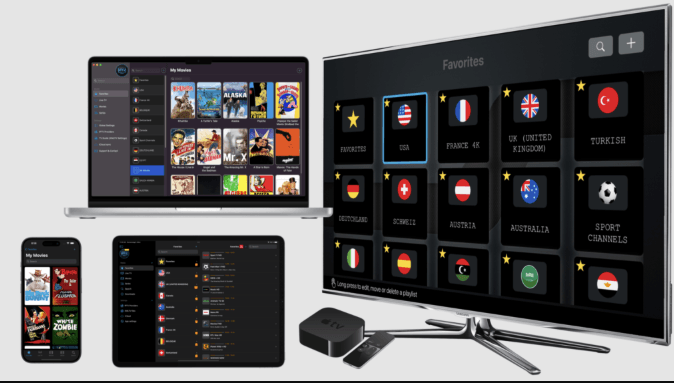
IPTV Player Zero is quickly becoming a favorite among users who want a modern, reliable, and feature-rich solution.
Key Features:
- Supports M3U, Xtream Codes, and Stalker Portal
- Sleek and modern interface
- Fast and stable playback
- Available for both Windows and MacOS
- Easy installation via website or official app stores
What makes IPTV Player Zero stand out is its simplicity combined with powerful functionality. It’s designed for both beginners and advanced users, ensuring a seamless streaming experience.
2. VLC Media Player
VLC is a well-known, free, and open-source media player that also supports IPTV.
Pros:
- Completely free
- Supports M3U playlists
- Lightweight and fast
Cons:
- Outdated interface
- Limited IPTV-specific features
- No built-in EPG support
While VLC is a great starting point, it lacks the advanced features modern IPTV users expect.
3. IINA Player
IINA is a Mac-native media player with a beautiful interface.
Pros:
- Designed specifically for MacOS
- Smooth playback
- Clean UI
Cons:
- Limited IPTV functionality
- No advanced playlist management
It’s a good option for casual users but not ideal for heavy IPTV usage.
4. GSE Smart IPTV
GSE Smart IPTV is another popular option for Mac users.
Features:
- Supports multiple playlist formats
- EPG integration
- Customizable interface
However, some users find it slightly complex compared to newer, more streamlined apps.
See also: How Wearable Tech Is Enhancing Player Performance in Golf
Why IPTV Player Zero is a Strong Choice
If you’re looking for a balance between performance, usability, and modern design, IPTV Player Zero is worth serious consideration.
Here’s why:
All-in-One Compatibility
It supports all major IPTV formats including:
- Xtream Codes
- M3U playlists
- Stalker Portal
This means you won’t need multiple apps for different services.
Modern User Experience
Unlike older players, IPTV Player Zero focuses on design. The interface is clean, responsive, and easy to use even for beginners.
Cross Platform Availability
You can use it on both Windows and MacOS, making it ideal for users who switch between devices.
Easy Access and Installation
You can download it directly from the website or install it via official stores, ensuring a safe and quick setup.
Tips for Better IPTV Streaming on Mac
To get the best performance from your IPTV player, follow these tips:
1. Use a Stable Internet Connection
A high-speed connection (at least 20 Mbps) is recommended for HD streaming.
2. Keep Your App Updated
Always use the latest version of your IPTV player to avoid bugs and improve performance.
3. Choose a Reliable IPTV Provider
Even the best player won’t help if your IPTV service is unstable.
4. Use Ethernet Instead of Wi-Fi
If possible, connect your Mac directly to the router for more stable streaming.
Common Issues and How to Fix Them
Buffering Problems
- Check your internet speed
- Reduce stream quality
- Restart your router
Playlist Not Loading
- Verify your M3U or Xtream credentials
- Ensure the URL is active
App Crashes
- Update the app
- Restart your Mac
- Reinstall the player if needed
Future of IPTV on Mac
The IPTV landscape is evolving rapidly. In 2026, users expect:
- Faster streaming
- Better UI/UX
- AI-based recommendations
- Cloud synchronization across devices
Modern players like IPTV Player Zero are already moving in this direction, making IPTV more accessible and enjoyable than ever.
Final Thoughts
Choosing the right IPTV player can completely transform your streaming experience. While there are several options available, not all are optimized for Mac users.
If you want something simple, modern, and powerful, IPTV Player Zero stands out as a top contender. It combines advanced features with an easy-to-use interface, making it suitable for both beginners and experienced users.
When selecting the best IPTV Player Mac, focus on compatibility, performance, and usability. With the right choice, you’ll enjoy smooth, high-quality streaming without frustration.