Long road trips, delayed flights, and restless kids in the back seat — traditional travel entertainment has always felt like a compromise. Laptops run out of battery, tablets lack versatility, and portable DVD players feel like relics from another era. Families on the go deserve something better, and that’s exactly where smart displays enter the picture.
Smart displays represent a genuine leap forward for travelers who want more than just a screen. These all-in-one devices combine streaming access, voice control, video calling, and productivity tools into a single portable package. But can they truly replace the best travel portable monitors on the market, or do they offer something entirely different?
For home users who prioritize seamless home entertainment and intuitive hands-free control, smart displays make a compelling case. Whether you’re keeping children entertained on a cross-country drive or catching up on work between flights, these devices are designed to adapt to your needs. This article explores how smart displays tackle real travel challenges and whether they deserve a permanent spot in your travel bag.




Understanding Smart Displays: The Ultimate Travel Companion
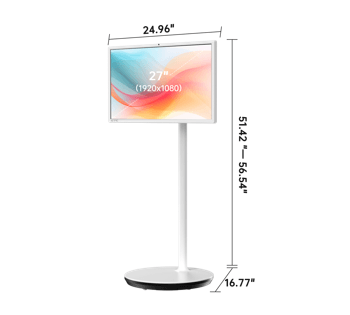
A smart display is fundamentally different from a standard portable monitor. While a portable monitor simply extends your laptop’s screen, a smart display is a fully independent device — combining a touchscreen, built-in speakers, wireless connectivity, and a smart assistant into one compact unit. Think of it as a tablet and a smart speaker merged into something more capable than either one alone.
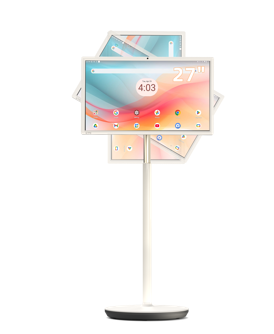
What makes a Smart Display genuinely travel-friendly comes down to three core strengths. First, portability: modern smart displays are slim, lightweight, and designed to move with you rather than anchor you to a desk. Second, connectivity: with built-in Wi-Fi and Bluetooth, they sync effortlessly with hotel networks, mobile hotspots, and Bluetooth headphones without requiring extra cables or adapters. Third, multifunctionality: in a single device, you get streaming entertainment, video calling, navigation assistance, and even smart home control — all accessible through touch or voice.
For families comparing options against the best travel portable monitors — including well-regarded options from brands like KTC, which has built a reputation for versatile display solutions — the distinction becomes clear quickly. A portable monitor still needs a host device to function, which means carrying a laptop, managing two batteries, and dealing with extra cables. A smart display operates independently from the moment you power it on. Kids can watch their favorite shows while parents handle video calls in the next seat, all without juggling multiple gadgets.
Beyond convenience, smart displays offer a more intuitive experience for everyday users. You don’t need to be tech-savvy to navigate one — the interface is visual, responsive, and designed around natural interaction. For road trips, long-haul flights, or hotel evenings where you just want things to work without setup friction, that simplicity is genuinely valuable. Smart displays don’t just match traditional travel screens; in many real-world scenarios, they outperform them.
See also: Tehnikpack: Impact on the Environment and Industry Standards
Meeting Home User Needs: Entertainment and Voice Control Solutions
Access to Streaming Apps Anywhere
One of the biggest frustrations for traveling families is losing access to the home entertainment setup they rely on daily. Smart displays solve this directly by running popular streaming platforms — Netflix, Disney+, YouTube, Amazon Prime Video, and more — natively, without needing a connected laptop or external device. Open the app, sign in once, and your entire library is available wherever you land.
For trips through areas with unreliable connectivity, preparation matters. Most streaming apps on smart displays support offline downloads, letting you load up movies, episodes, or playlists before you leave home. Connect to your mobile hotspot when Wi-Fi isn’t available, and the experience stays smooth. A few practical steps make this seamless: download content over home Wi-Fi the night before your trip, organize playlists by child or preference, and enable data-saver mode on your hotspot to extend mobile data through longer journeys. Smart displays bring genuine home entertainment quality to the road — no compromises, no extra hardware required.
Hands-Free Operation with Google Assistant
Traveling with kids means your hands are rarely free. Google Assistant transforms how families interact with their smart display by making voice commands the primary control method. Ask it to play a specific show, skip to the next episode, call a family member, or pull up directions to your next stop — all without touching the screen.
Setting it up takes minutes. During initial device setup, follow the prompt to enable Google Assistant and complete the Voice Match training so it recognizes your voice accurately in noisy environments like cars or airports. Once configured, you can manage smart home devices remotely — checking whether you left the lights on, locking doors, or adjusting thermostats — directly from the road. For families juggling bags, car seats, and itineraries simultaneously, hands-free control isn’t just convenient. It’s a genuine travel advantage that standard portable monitors simply cannot offer.
Enhancing Productivity: Multitasking and Android 14 Features
Multitasking Capabilities on the Go
Travel rarely means doing just one thing at a time. Smart displays support split-screen functionality, letting you run two apps side by side — streaming a show for the kids on one half while you browse hotel options or review tomorrow’s itinerary on the other. This multitasking capability means a single device genuinely serves the whole family simultaneously. Parents can monitor a navigation app while children stay absorbed in their content, eliminating the need to pass a single device back and forth. For busy families where every minute of travel time counts, this kind of parallel operation transforms a smart display from a simple entertainment screen into a full productivity hub.
Leveraging Android 14 for a Smoother Experience
Android 14 brings meaningful improvements that directly benefit travelers. Enhanced privacy controls let you grant apps precise permissions — useful when connecting to unfamiliar hotel or airport networks. Better app compatibility means your favorite streaming, navigation, and productivity tools run more reliably without crashes or slowdowns mid-trip. Performance optimizations under Android 14 also improve battery efficiency, stretching screen-on time during long travel days. For families, the upgraded parental controls offer granular management over what children can access independently on the device. These aren’t incremental updates — Android 14 makes the smart display experience noticeably more stable, secure, and responsive in exactly the unpredictable environments that travel creates.
Practical Solutions: Setting Up Your Smart Display for Optimal Travel Use
Getting the most from your smart display on the road comes down to preparation. Follow these steps before you leave home to ensure a friction-free experience from the moment your trip begins.
Start with streaming setup. Open each streaming app — Netflix, Disney+, YouTube — sign in, and download content over your home Wi-Fi. Aim for at least four to six hours of video per child. Enable offline mode within each app’s settings so downloads remain accessible without a connection. Next, configure Google Assistant by completing Voice Match training in a quiet room, then test commands in a louder environment to confirm recognition accuracy. Add your smart home devices to the Assistant app so you can manage them remotely during travel.
For multitasking, enable split-screen by holding the recent apps button and selecting your second app from the prompt — practice this once before your trip so it feels instinctive mid-journey. Then update to Android 14 through Settings > System > Software Update, and review the new app permissions under Settings > Privacy to tighten access for unfamiliar networks.
Finally, manage power proactively. Lower screen brightness to around 50 percent, disable Bluetooth when unused, and carry a 20,000mAh power bank to sustain full-day use. Toggle your mobile hotspot’s data-saver mode to preserve cellular data on longer stretches. These combined steps take under an hour at home but eliminate the most common travel frustrations entirely.
Smart Displays vs. Portable Monitors: The Clear Choice for Family Travel
Smart displays have genuinely redefined what travel entertainment can look like. Where traditional solutions forced families to compromise — hauling laptops, managing cables, or settling for limited functionality — smart displays consolidate everything into a single, intuitive device that works from the moment you power it on.
The case for smart displays comes down to four clear advantages. Streaming access through Netflix, Disney+, YouTube, and more means your home entertainment library travels with you, offline downloads included. Google Assistant’s hands-free control removes the friction of managing a device while simultaneously managing a family in motion. Split-screen multitasking lets one device serve multiple needs at once, whether that’s navigation alongside entertainment or productivity alongside play. And Android 14’s performance, privacy, and compatibility improvements make the entire experience more reliable in the unpredictable environments that travel creates.
Compared to the best travel portable monitors, smart displays don’t just compete — they operate in an entirely different category. A portable monitor extends a screen; a smart display extends your capabilities. For families who want fewer devices, less setup friction, and more versatility on the road, the choice becomes straightforward. Smarter travel starts with smarter technology, and smart displays deliver exactly that.