Modern worship has evolved far beyond traditional hymn books and printed bulletins. Today’s congregations expect immersive, visually compelling experiences that reinforce spiritual messages and keep audiences engaged throughout services. LED walls have become central to this transformation, serving as dynamic backdrops for sermons, scripture displays, and live event production in churches of all sizes.
Yet with this technological leap comes a significant responsibility for AV technicians: keeping these systems running flawlessly, service after service. A flickering module mid-sermon or an unexpected display failure during a major holiday event can disrupt the entire worship experience. Churches operate on tight schedules and tighter budgets, making reliability non-negotiable.
This article is designed specifically for AV professionals tasked with managing church LED display systems. From understanding the fundamentals of LED wall technology to leveraging innovations like C-Carbon P3.91 panels and fanless cooling systems, you’ll find actionable guidance covering installation best practices, routine maintenance, and performance optimization. Whether you’re setting up a new system or improving an existing one, these strategies will help you deliver consistent, high-quality visual experiences that support your congregation’s worship journey.

Understanding LED Wall Technology for Church Applications
LED walls for churches have become indispensable tools for modern worship, transforming how congregations connect with sermons, scripture, and live performances. Unlike traditional projection systems, LED panels deliver consistent brightness even in well-lit sanctuaries, making them ideal for stages where ambient lighting cannot always be controlled. They enable dynamic content display—from song lyrics and sermon notes to live camera feeds—creating a more immersive spiritual environment that resonates with diverse audiences.
However, AV technicians managing these systems regularly encounter reliability challenges that can disrupt services at critical moments. Module failures caused by overheating, inconsistent power delivery, or physical damage during frequent setup and teardown cycles are among the most common issues. Churches that host multiple weekly services, seasonal events, and community gatherings place extraordinary demands on their display systems. Environmental factors—humidity from crowded rooms, temperature fluctuations in older buildings, and vibrations from live music—further stress LED components. Understanding these vulnerabilities is the first step toward building a maintenance strategy that keeps your display performing reliably, service after service, without unexpected interruptions.
Key Features for Reliability: C-Carbon P3.91 and Lightweight Design
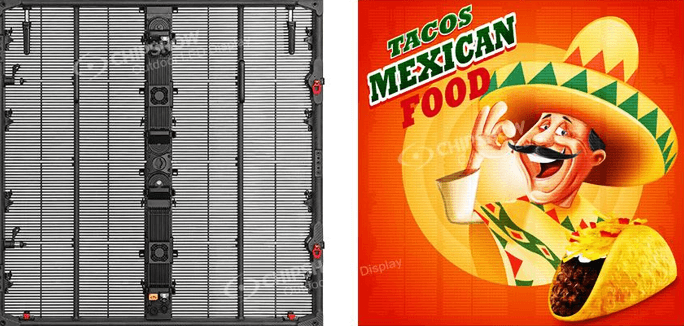
When selecting LED panels for church environments, the C-Carbon P3.91 stands out as a purpose-built solution for demanding worship applications. Its 3.91mm pixel pitch delivers sharp, readable text and vivid imagery at typical sanctuary viewing distances, ensuring scripture, lyrics, and live feeds remain crisp from the front row to the back balcony. The carbon fiber composite cabinet construction is a critical reliability advantage—carbon fiber naturally dissipates heat more efficiently than aluminum alternatives while resisting the warping and corrosion that humid, high-occupancy environments accelerate over time. This structural integrity translates directly into fewer module failures and more consistent color uniformity across the entire display surface, service after service.
The lightweight LED wall design of C-Carbon panels addresses one of the most overlooked reliability factors: handling stress. Church AV teams frequently reconfigure displays between weekend services, seasonal productions, and community events. Heavier panels increase the risk of dropped modules, connector damage, and mounting hardware fatigue. Panels engineered for reduced weight allow smaller crews to assemble and disassemble displays safely, reducing accidental damage that leads to costly replacements. Beyond physical durability, lighter cabinets also place less structural load on stage rigging and temporary mounting systems—an important consideration in older church buildings where load-bearing capacity may be limited. Manufacturers like Chipshow LED have developed panel systems that combine superior image quality with practical handling advantages, making them a reliable long-term investment for AV teams managing high-frequency deployment schedules.
Step-by-Step Installation Best Practices for AV Technicians
Pre-Installation Planning and Site Assessment
Before mounting a single panel, walk the sanctuary with a measuring tape and a critical eye. Document the stage width, ceiling height, and primary viewing distances from the front row and rear balcony. Identify power outlet locations and verify circuit capacity—LED walls typically require dedicated 20-amp circuits to prevent voltage fluctuations during peak brightness moments. Note any ambient light sources, including windows and overhead fixtures, that could wash out the display. This assessment shapes every decision that follows, from panel quantity to optimal mounting height.
Mounting and Configuring the LED Wall Modules
Begin assembly from the bottom row upward, seating each module firmly until the magnetic or mechanical connectors click into place. Route data and power cables through designated cable management channels before securing adjacent panels—retrofitting cables later risks connector damage. Once physically assembled, connect the receiving card to your video processor and run a full white-field test to confirm uniform brightness across every module. Use the manufacturer’s calibration software to fine-tune color temperature and gamma settings, matching the display output to your lighting director’s preferred white balance for worship environments.
Safety and Compliance Checks
After installation, verify that all rigging hardware meets the rated load capacity, with a minimum safety factor of five-to-one for overhead configurations. Inspect every power connection for secure termination and confirm ground continuity with a multimeter. Cross-reference your installation against local electrical codes and the venue’s fire safety regulations, particularly regarding cable fire ratings and emergency exit visibility. Document your compliance checks in a signed installation log—essential for insurance purposes and future service reference.
See also: How Wearable Tech Is Enhancing Player Performance in Golf
Maintenance and Module Service Strategies for Longevity
Consistent module service is what separates LED walls that last a decade from those that fail within two years. Establish a weekly inspection routine before each service cycle: visually scan the entire display surface for dead pixels, color shifts, or dimming clusters that signal a failing driver IC or loose data connection. A quick white-field and red-field test takes under five minutes and catches problems before they surface mid-sermon.
Monthly cleaning is equally essential. Use compressed air to clear dust from cabinet vents and connector ports, then wipe panel faces with an anti-static microfiber cloth. Avoid liquid cleaners near connector areas—moisture infiltration is a leading cause of premature module failure in high-occupancy sanctuaries where humidity spikes during packed services. Inspect ribbon cables and power connectors for fraying or corrosion at the same interval.
When a module does fail, efficient replacement minimizes service disruption. Keep at least two spare modules on-site, pre-calibrated to match your wall’s current brightness and color settings. Most modern panels support tool-free front-access removal—slide the faulty module out, seat the replacement, and run a targeted calibration patch rather than recalibrating the entire wall. Log every replacement with the date, module position, and failure symptom. This service record reveals recurring failure patterns, helping you identify systemic issues like inadequate power delivery or structural stress points before they cascade into larger, costlier outages.
Optimizing Performance in Various Church Environments
Church venues present remarkably diverse display challenges. A traditional sanctuary with high ceilings and stained glass windows demands different calibration than a modern multipurpose hall or an outdoor amphitheater used for summer worship events. In sanctuary settings, ambient light from side windows creates uneven illumination across the stage, requiring brightness adjustments—typically between 800 and 1,200 nits—to maintain legibility without overwhelming the atmosphere. Program your video processor with scene-specific presets so operators can switch between Sunday morning, evening service, and concert configurations with a single button press rather than manual recalibration under pressure.
Multipurpose rooms present their own variables. Folding partition walls alter acoustics and reflective surfaces shift perceived color temperature as room configurations change. Establish a baseline calibration profile for each common room layout and store it in your control system. For outdoor events, shield data cable connectors from moisture with weatherproof covers and raise brightness output to compensate for direct sunlight, while monitoring operating temperatures closely—heat buildup accelerates significantly in open-air environments without climate control.
Regardless of venue type, consistent color uniformity requires periodic recalibration as LED panels age. Schedule a full-wall colorimetry check every six months using a calibrated colorimeter, adjusting individual module gain settings to compensate for natural luminance drift. This proactive approach keeps your display looking intentional and professional across every environment your church uses throughout the year.
Enhancing Reliability with Advanced Fanless Cooling Systems
In a sanctuary where silence amplifies every spoken word and musical note, fan noise from AV equipment is more than an annoyance—it’s a genuine distraction from worship. Fanless cooling systems eliminate this problem entirely by using passive thermal management through conductive materials and optimized airflow channels built directly into the cabinet structure. The C-Carbon P3.91’s carbon fiber construction contributes here as well, conducting heat away from LED drivers without mechanical components that wear out and fail. Without spinning fans, there are no motors to seize, no filters to clog with dust, and no bearings to replace—dramatically reducing maintenance touchpoints and extending overall module service life. For AV technicians managing systems across multiple weekly services, fewer mechanical failure points translate directly into fewer emergency interventions and more predictable operating costs over the system’s lifespan.
Building a Proactive LED Wall Management Strategy for Churches
Reliable LED wall performance in church environments doesn’t happen by accident—it’s the result of deliberate technology choices, disciplined installation practices, and consistent maintenance habits. Throughout this guide, we’ve covered the essential pillars of dependable module service: selecting purpose-built hardware like the C-Carbon P3.91 with its carbon fiber construction and lightweight design, following structured installation protocols that account for site-specific variables, and implementing weekly and monthly maintenance routines that catch problems before they disrupt services.
Advanced fanless cooling systems add another layer of reliability, eliminating mechanical failure points while keeping sanctuaries acoustically clean. Calibrating your display for each unique environment—whether a traditional sanctuary, a multipurpose hall, or an outdoor venue—ensures your congregation always receives a professional, visually consistent worship experience regardless of the setting.
As an AV technician, you are the backbone of your church’s visual ministry. The strategies outlined here give you a practical framework to move from reactive troubleshooting to proactive system management. Start by auditing your current maintenance schedule, identify any gaps in your spare parts inventory, and evaluate whether your cooling and cabinet solutions are truly built for your deployment frequency. Implement these steps now, and you’ll deliver the seamless, distraction-free visual experiences that allow your congregation to focus entirely on worship.