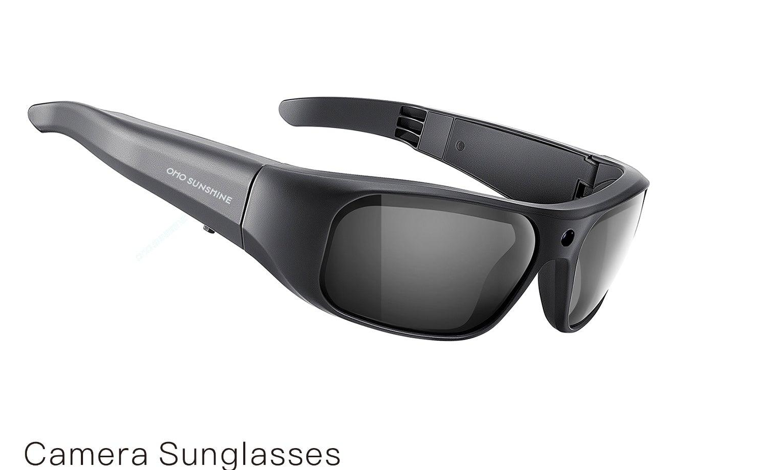
You’re mid-adventure, hands gripping a kayak paddle, wind rushing past your face, and the perfect content moment unfolds right in front of you. But your phone sits zipped in a dry bag, and your GoPro is mounted at an angle that captures mostly sky. Every content creator knows this frustration — the gap between living an authentic moment and actually capturing it for social media. Traditional equipment demands your attention, your hands, and often kills the very spontaneity that makes content resonate with audiences. Smart camera glasses are changing this equation entirely. These wearable devices sit naturally on your face, recording exactly what you see from a genuine first-person perspective, no setup required. This article walks you through mastering video recording glasses for social media — from understanding the technology and optimizing your workflow to sharing content that stops the scroll. Whether you’re a travel vlogger, fitness creator, or lifestyle influencer, learning to leverage this hands-free recording tool will transform how you capture and share your world.
What Are Smart Camera Glasses? Beyond Ordinary Eyewear
Smart camera glasses are wearable devices that embed a fully functional recording system into frames you wear like regular eyewear. Unlike standard smart glasses that focus primarily on displaying notifications or providing audio, and unlike traditional action cameras that require mounting and manual operation, these devices are purpose-built for capturing life from your exact visual perspective without any additional gear.
The technology packs several critical components into a surprisingly lightweight form factor. A discreet HD camera lens sits near the bridge or temple of the frames, capturing video at resolutions suitable for social media platforms. Built-in microphones pick up ambient sound and your voice clearly, while an onboard battery powers recording sessions throughout your day. A compact processing unit handles encoding and temporary storage, keeping everything running smoothly behind the scenes.




The core functionality centers on hands-free video recording and instant photo capture — tap a button or speak a command, and you’re rolling. What truly sets these devices apart for content creators is their WiFi and Bluetooth transmission capability. This wireless connectivity lets you transfer footage directly to your smartphone, preview shots in real-time through companion apps, and move from recording to editing without cables or card readers slowing you down.
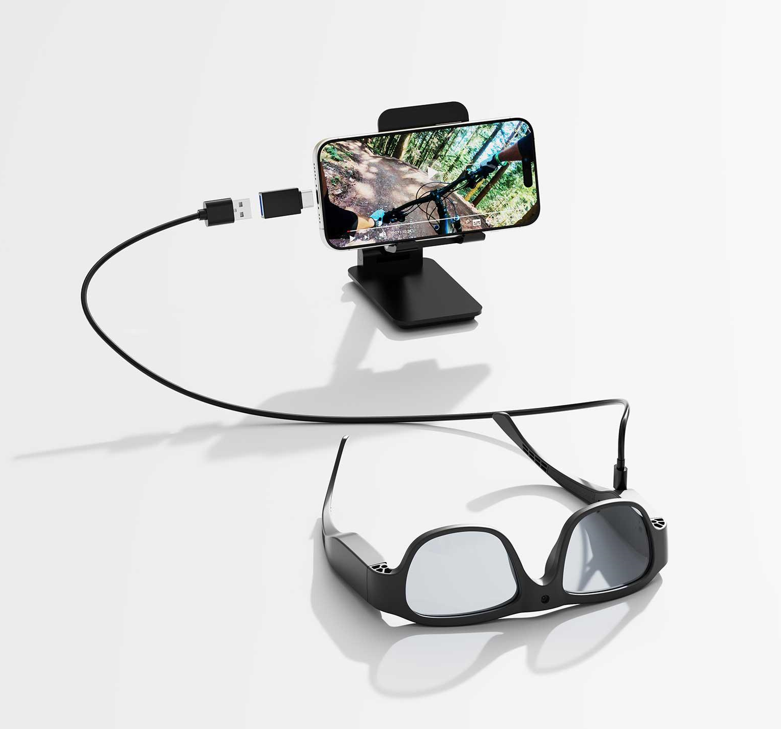
Design variety has expanded significantly to match different creator aesthetics. Brands like ohosunshine offer sporty wraparound styles built for outdoor adventures, classic wayfarer-inspired frames that blend into everyday streetwear, and even prescription-compatible options for creators who need corrective lenses. Whether your brand is rugged explorer or urban minimalist, there’s a frame style that fits your on-camera persona while keeping the technology virtually invisible to your audience.
Why Smart Glasses Are a Game-Changer for Content Creators
Content creators face a constant tension between participating in moments and documenting them. Smart camera glasses eliminate this compromise entirely, offering advantages that no other recording device can match for social media work.
Authenticity and Immersive Perspective
Audiences crave content that feels real, and nothing delivers authenticity like genuine first-person perspective. When viewers watch footage from video recording glasses, they experience exactly what you experienced — the same head turns, the same focus shifts, the same natural framing of a conversation or landscape. This immersive POV transforms cooking tutorials from static overhead shots into dynamic experiences where viewers feel like they’re the ones chopping ingredients. Travel vlogs become virtual journeys rather than distant observations. The emotional connection deepens because the camera isn’t a barrier between you and the moment — it disappears completely, and your audience steps directly into your shoes.
The Ultimate Tool for Quick, Hands-Free Content Creation
Speed matters in social media. Trends emerge and fade within hours, and the creators who win are those who capture and post fastest. Smart camera glasses remove every friction point from the recording process. You’re surfing, rock climbing, or navigating a crowded street market — a single tap starts recording without breaking your stride. There’s no fumbling for a phone, no adjusting a tripod, no asking someone to film you. This spontaneity produces content that feels alive rather than staged, which algorithms and audiences both reward. You capture twenty potential clips in the time it would take to set up one traditional shot.
High-Quality Recording Meets Discreet Design
Modern smart camera glasses deliver video quality that rivals smartphone front-facing cameras, with stabilization and audio clarity optimized for social media consumption. The footage doesn’t need to be cinema-grade — it needs to look great on a phone screen, and these devices nail that sweet spot. Equally important is their unobtrusive nature. Recording in cafes, at events, or during interviews feels natural when your equipment looks like ordinary eyewear. People around you behave authentically because they don’t notice a camera pointed at them, resulting in footage that captures genuine reactions and unguarded moments that polished productions simply cannot replicate.
Your Step-by-Step Guide to Using Video Recording Glasses
Owning smart camera glasses is one thing — getting the most out of them requires understanding the setup process and building efficient habits around their controls and file management. Here’s how to go from unboxing to capturing share-ready content.
Step 1: Initial Setup and Pairing for Seamless WiFi Transmission
Start by fully charging your glasses using the included cable or charging case, which typically takes sixty to ninety minutes. While they charge, download the companion app on your smartphone — most manufacturers offer dedicated apps for both iOS and Android that serve as your command center. Once powered on, enable Bluetooth on your phone and open the app to initiate pairing. The glasses will appear as a discoverable device, and a single tap confirms the connection. After Bluetooth pairing establishes the initial handshake, the app will prompt you to connect via WiFi for faster data transfer. Accept this connection, and your glasses and phone now communicate seamlessly. Test the link by opening the live preview feature in the app — you should see exactly what the glasses camera sees displayed on your phone screen. This preview is invaluable for checking framing and angle before you start recording in earnest.
Step 2: Mastering Recording Controls and Settings
Familiarize yourself with the physical controls first. Most video recording glasses feature a tactile button on the temple arm — a single press captures a photo, while a long press initiates video recording. Some models include a swipe-sensitive touchpad for navigating modes or a dedicated voice command system where saying a wake phrase starts recording hands-free. Dive into the companion app settings to configure your recording parameters. Set your resolution to 1080p for the best balance between quality and file size on social platforms. Adjust frame rate to 30fps for standard content or 60fps if you’re capturing fast-moving activities like cycling or skateboarding where smooth motion matters. Field of view settings let you choose between a wider angle for landscape and adventure content or a narrower perspective that mimics natural human vision for conversations and tutorials. Spend ten minutes experimenting with these settings in different environments so you understand how each adjustment affects your final output.
Step 3: Transferring and Managing Your Footage
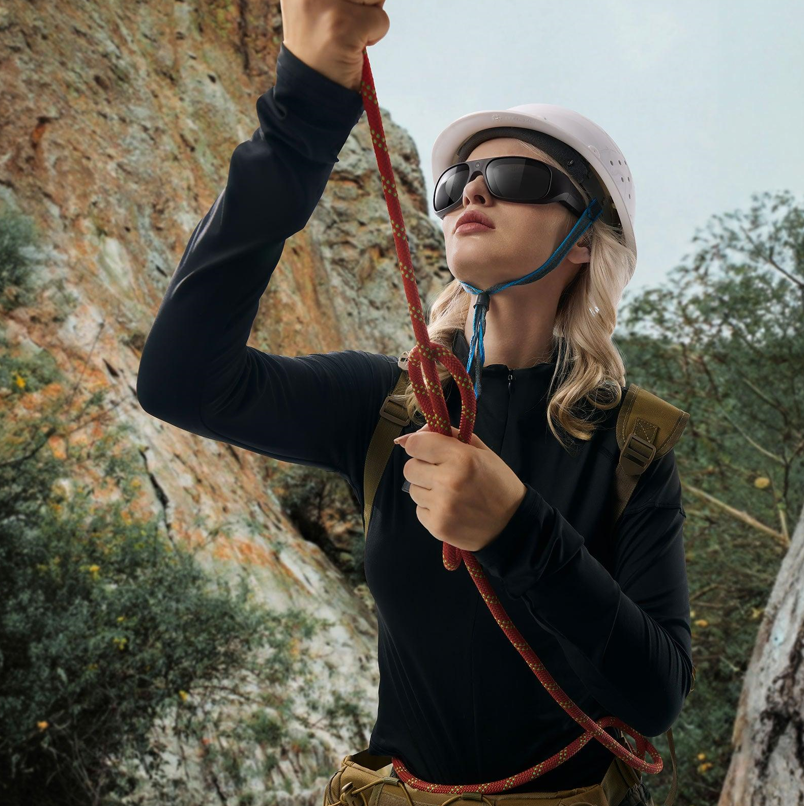
After a recording session, open your companion app and navigate to the gallery or transfer section. The app displays thumbnails of all clips stored on the glasses, and you can select individual files or batch-transfer everything via WiFi transmission. Transfer speeds vary, but most modern smart glasses move a one-minute HD clip to your phone in under thirty seconds over direct WiFi connection. Once footage lands on your device, organize immediately rather than letting clips pile up. Create dedicated folders by date or project — this simple habit prevents the chaos of scrolling through hundreds of unnamed files when you need specific content. Many companion apps also offer basic trim functionality, letting you cut the beginning and end of clips before they even leave the app. Use this to eliminate the moments where you’re tapping the record button or adjusting the glasses on your face, so every transferred clip is clean and ready for your editing workflow.
See also: Lightweight Helmet Mounted Sight with Extended Battery Life
Optimizing and Sharing Your Content on Social Media
Recording great footage is only half the equation. The real magic happens when you transform raw clips from your video recording glasses into polished posts that perform across platforms. Here’s how to bridge the gap between capture and publish efficiently.
Quick-Editing Tips for Mobile-First Content
Since your footage transfers directly to your phone, lean into mobile editing apps that match this streamlined workflow. CapCut and InShot handle short-form content brilliantly, offering one-tap stabilization that smooths out any head movement artifacts from your smart camera glasses. VN Video Editor provides more granular control over color grading — bump up saturation slightly and add a touch of warmth to make first-person footage pop on small screens. When trimming clips, cut aggressively. Social media rewards tight, punchy edits over drawn-out sequences. A fifteen-second clip with three dynamic angle changes (achieved simply by turning your head while recording) outperforms a static sixty-second shot every time. For vertical content, most companion apps now export in 9:16 ratio natively, but if yours doesn’t, crop in your editor by centering the most interesting part of the frame.
Crafting Captions and Hashtags for Maximum Reach
Your unique first-person perspective deserves captions that highlight the experience. Phrases like “see exactly what I saw” or “through my eyes” immediately communicate the immersive quality of your content and stop scrollers who are tired of standard angles. Lean into curiosity gaps — “I didn’t expect this when I turned the corner” works because viewers know they’ll see the reveal from your literal viewpoint. For hashtags, combine niche-specific tags with technology-forward ones. Pair your content category tags (#streetfood, #trailrunning, #behindthescenes) with discovery tags like #smartglasses, #videorecordingglasses, #POVcontent, and #handsfreefilming. This dual approach reaches both your target audience and tech-curious viewers exploring wearable content creation.
Platform-Specific Strategies for Sharing
Instagram Reels and TikTok thrive on fast-paced, visually surprising content. Use the natural head-movement transitions from your glasses as creative cuts — look down at ingredients, look up at the finished dish, and edit these as separate scenes stitched together. Add trending audio over your footage since these platforms prioritize sound-on engagement. For YouTube, compile your best smart glasses clips into longer narrative vlogs or tutorials. The first-person perspective works exceptionally well for “day in my life” formats and how-to content where viewers benefit from seeing exactly what your hands are doing. Facebook favors slightly longer clips with text overlays for sound-off viewing, so add captions summarizing what’s happening in your POV footage to capture attention during silent autoplay in feeds.
Elevate Your Content Creation with Video Recording Glasses
Smart camera glasses have fundamentally redefined what’s possible for content creators who refuse to choose between living their moments and sharing them. The combination of authentic first-person perspective, hands-free operation, and social-media-ready quality addresses the exact pain points that have limited creators relying on phones, tripods, and traditional action cameras. These devices deliver on the promise of spontaneous, high-quality content without the setup friction that kills creativity.
Mastering this technology comes down to three interconnected skills: recording with intention by understanding your controls and settings, transferring efficiently through WiFi transmission to maintain your creative momentum, and sharing strategically by tailoring your unique POV footage to each platform’s strengths. When these elements work together, you build a content workflow that’s faster, more authentic, and more engaging than anything conventional gear allows.
The creators who stand out in today’s crowded social landscape aren’t necessarily those with the most expensive equipment — they’re the ones who remove barriers between inspiration and execution. Video recording glasses put you in that position every time you put them on. Start capturing your world from the perspective only you can offer, and let your audience experience life through your eyes. The story only you can tell is waiting to be shared.