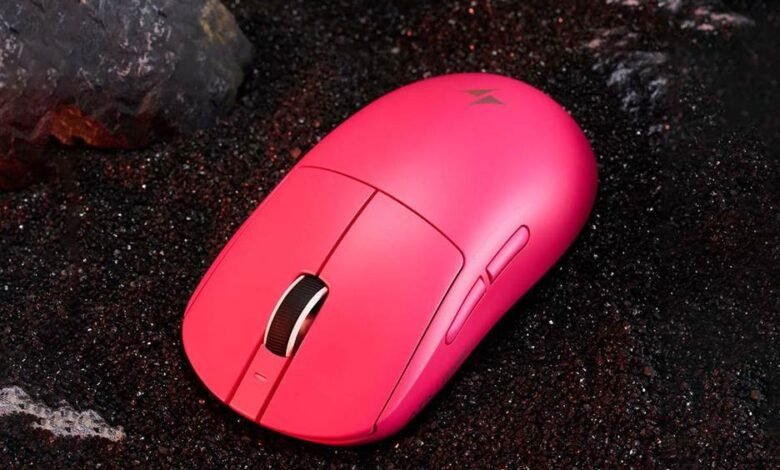
In the high-stakes world of esports, where matches are decided by milliseconds and pixel-perfect aim separates champions from contenders, your equipment isn’t just an accessory—it’s a competitive weapon. Every flick, every tracking movement, every split-second reaction depends on the tool in your hand delivering exactly what your brain commands. Yet for years, gamers have wrestled with a frustrating reality: traditional mice plagued by input lag, inconsistent tracking, and the physical limitations of tangled cables dragging across desks. These issues don’t just annoy players—they actively sabotage performance when it matters most. The latest generation of wireless gaming mice has shattered these barriers entirely. Armed with cutting-edge optical sensors, revolutionary motion integrity systems, and ultra-low-latency wireless connections, today’s top wireless mice deliver precision that rivals and often surpasses their wired counterparts. This article explores how these technological breakthroughs are transforming competitive gaming, breaking down the science behind optical sensor performance and motion integrity while providing a practical roadmap to help you choose the best wireless mouse for gaming that unlocks your true potential.
Why Wireless Gaming Mice Are Essential for Modern Esports
The journey from wired to wireless gaming peripherals mirrors the broader evolution of competitive gaming itself—a relentless pursuit of removing every obstacle between intention and execution. A decade ago, serious players dismissed wireless mice as casual toys, plagued by noticeable latency and unreliable connections. That era is over. Modern wireless gaming mice now operate with response times indistinguishable from wired alternatives, and professional esports athletes across titles like Counter-Strike 2, Valorant, and Apex Legends have made the switch without looking back.
For esports competitors, the demands are uncompromising. They need tools that deliver consistent, high-precision tracking through hours of practice and tournament play. Wireless mice answer this call while eliminating one of the most underestimated performance killers: cable drag. Even with bungees and paracord mods, a physical cable introduces variable resistance that subtly disrupts muscle memory and micro-adjustments. Cutting the cord removes that inconsistency entirely, granting players unimpeded freedom of movement across their mousepads. Combined with advances in lightweight construction and ultra-fast wireless protocols, today’s wireless gaming mice represent the cutting-edge technology that competitive players demand—not a compromise, but a genuine upgrade that aligns perfectly with the precision and reliability modern esports requires.




See also: emerging technology trends 2023
Decoding Gaming Mouse Performance: Optical Sensors and Motion Integrity
At the heart of every elite wireless gaming mouse lies a sophisticated ecosystem of technologies working in concert to translate your physical movements into on-screen precision. Understanding these core components isn’t just technical trivia—it’s the foundation for making informed decisions about the gaming gear technology that will define your competitive experience. Two pillars stand above the rest in determining gaming mouse performance: the optical sensor that captures every movement and the motion integrity systems that ensure those movements are faithfully reproduced on screen. Together, they form the backbone of what separates a tournament-grade peripheral from everything else on the market.
The Science Behind Optical Sensors in Gaming
Optical sensors work by using an infrared or laser LED to illuminate the surface beneath the mouse, while a tiny CMOS camera captures thousands of images per second to detect changes in position. The sensor’s processor then calculates direction and velocity in real time, feeding that data to your PC with extraordinary speed. Modern optical sensors designed for esports achieve tracking speeds exceeding 750 inches per second and acceleration tolerance beyond 50G, meaning they won’t lose track of your cursor even during the most violent flick shots. What makes these sensors critical for gaming mouse performance is their ability to deliver true one-to-one input—zero built-in acceleration, zero angle snapping, and minimal signal processing that could introduce latency. For competitive players, this translates directly into aim that feels instinctive and trustworthy, where the cursor lands exactly where muscle memory dictates it should.
Motion Integrity: Ensuring Flawless Tracking for Competitive Play
Even the most capable optical sensor means little if the data it produces is corrupted between capture and execution. Motion integrity refers to the complete signal chain’s ability to preserve accurate positional data without introducing artifacts like jitter, smoothing, or pixel-skipping. In fast-paced titles where players execute rapid 180-degree turns or make imperceptible micro-corrections while holding an angle, any breakdown in motion integrity becomes immediately apparent as inconsistent or “floaty” cursor behavior. Advanced wireless gaming mice combat this through intelligent firmware algorithms that filter noise without adding latency, paired with high-frequency wireless polling that transmits positional updates with minimal delay. The result is tracking that remains rock-solid whether you’re making slow, deliberate crosshair adjustments or whipping across your entire mousepad in a fraction of a second.
Advanced Gaming Gear Technology: Beyond the Basics
Sensor quality and motion integrity form the foundation, but today’s cutting-edge gaming gear technology extends further. High polling rates—now reaching 4,000Hz and beyond on flagship models from brands like ATK Gear—reduce the time between position updates to fractions of a millisecond, delivering smoother visual feedback and tighter input response. Adjustable DPI settings allow players to fine-tune sensitivity on the fly, matching different scenarios within a single match. Meanwhile, ergonomic engineering informed by professional player feedback ensures that lightweight shells, balanced weight distribution, and thoughtfully sculpted shapes support sustained performance across marathon sessions without fatigue undermining precision.
How to Select the Best Wireless Gaming Mouse: A Step-by-Step Practical Guide
Choosing the right wireless gaming mouse can feel overwhelming given the sheer number of options flooding the market, each promising elite-level performance. Rather than getting lost in marketing hype, approaching your decision through a systematic evaluation of the features that genuinely impact competitive play will lead you to the mouse that fits your needs. The following five steps break down exactly what to prioritize, giving you a clear framework to cut through the noise and invest in a tool that truly elevates your game.
Step 1: Evaluate Sensor Performance and Accuracy
Start by examining the optical sensor at the core of any mouse you’re considering. Look for sensors from reputable manufacturers that offer native DPI ranges broad enough to accommodate your preferred sensitivity without relying on software interpolation, which can degrade tracking quality. Pay attention to specifications like maximum tracking speed and acceleration tolerance, as these determine whether the sensor can keep up with aggressive flick shots and rapid directional changes. Most importantly, seek out sensors with zero smoothing and zero built-in acceleration at your desired DPI, ensuring raw one-to-one input that preserves the integrity of your aim.
Step 2: Check Latency and Connectivity Stability
Wireless performance hinges on how quickly and reliably the mouse communicates with your PC. Prioritize mice that use dedicated 2.4GHz wireless dongles over Bluetooth for gaming, as these proprietary connections deliver significantly lower latency—often matching or beating wired USB polling times. Investigate whether the mouse supports high-frequency wireless polling at 1,000Hz or above, and read community reviews or professional testing data to confirm that the connection remains stable without dropout during intense sessions. A wireless mouse that stutters or loses signal even once during a clutch round negates every other advantage it offers.
Step 3: Consider Ergonomics and Build Quality for Long Sessions
Your mouse shape must complement your natural grip style—whether palm, claw, or fingertip—because even the most technologically advanced mouse becomes a liability if it causes discomfort or fatigue during extended play. Test the weight carefully, as competitive players increasingly favor ultralight designs under 80 grams that reduce wrist strain and allow faster repositioning. Examine the build quality by checking for creaky shells, wobbly buttons, or rattling internals, since a mouse that feels flimsy undermines confidence and consistency. Durable primary switches with crisp, tactile actuation also matter for ensuring every click registers exactly when intended.
Step 4: Look for Cutting-Edge Features and Customization
Beyond core performance, advanced features can meaningfully enhance your workflow. Programmable side buttons let you bind essential in-game actions for faster execution, while onboard memory profiles allow you to carry your settings between different PCs at LAN events without installing software. Companion applications that offer granular control over lift-off distance, debounce timing, and DPI stages give you the flexibility to fine-tune behavior to your exact preferences. RGB lighting is largely aesthetic, but some players appreciate visual indicators for profile switching or battery status during gameplay.
Step 5: Assess Battery Life and Charging Solutions
Nothing derails a competitive session like a dead mouse. Look for models that deliver at least 60 to 80 hours of continuous use on a single charge, giving you the confidence to play through tournaments and practice blocks without constantly monitoring battery levels. Quick-charge capabilities are equally valuable—some mice provide several hours of gameplay from just a few minutes plugged in, serving as a reliable safety net between rounds. Wireless charging pad compatibility offers another convenient solution, letting you top off your mouse passively whenever it rests on your desk between sessions.
Elevate Your Competitive Edge with the Right Wireless Gaming Mouse
The wireless gaming mouse has evolved from a compromised alternative into the definitive tool for competitive players seeking every possible advantage. As we’ve explored, the technology driving this transformation runs deep—from optical sensors capable of capturing thousands of positional updates per second with flawless accuracy, to motion integrity systems that ensure every micro-adjustment and aggressive flick reaches your screen exactly as intended. These aren’t incremental improvements; they represent a fundamental shift in what gaming peripherals can deliver. By following a structured approach to your purchase—evaluating sensor precision, confirming low-latency wireless stability, prioritizing ergonomic fit, exploring advanced customization options, and ensuring dependable battery life—you equip yourself with a mouse that genuinely complements your skill rather than limiting it. The gap between wired and wireless performance has effectively disappeared, and the freedom of movement that comes with cutting the cord offers a tangible competitive benefit. Whether you’re grinding ranked ladders or competing on the tournament stage, investing in a high-quality wireless gaming mouse built on cutting-edge technology is one of the most impactful upgrades you can make to unlock your peak performance.