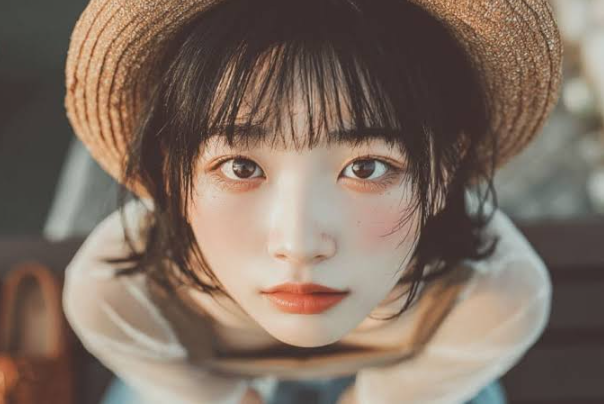
In the fast-paced world of short-form video content, visual appeal is everything. Whether you are scrolling through TikTok, Instagram Reels, or YouTube Shorts, you have likely noticed a distinct style of videos that feel effortlessly cinematic, bright, and impeccably polished. Much of this signature look comes down to color grading and specialized camera effects inspired by modern digital trends.
Among the various editing presets available today, the korean filter has emerged as a favorite for creators looking to elevate their visual storytelling.
Understanding the Korean Filter Aesthetic
The digital aesthetic popularized across East Asian social media platforms heavily emphasizes soft lighting, balanced contrast, and warm, clean undertones. Rather than heavy, dramatic color shifts, these filters focus on smoothing skin tones, enhancing natural lighting, and giving footage a dreamy, high-definition finish.



For content creators, achieving this look manually can take hours of tweaking exposure, saturation, and temperature curves in complex desktop software. Fortunately, web-based tools and mobile editing suites have streamlined this process, allowing anyone to apply professional-grade color grading with a single click.
Key Characteristics of the Aesthetic
- Soft Highlights: Controls bright spots to prevent harsh glares while maintaining a luminous glow.
- Subtle Warmth: Adds a gentle golden or peachy undertone to skin and surroundings, evoking a cozy cinematic feel.
- Clean Contrast: Keeps shadows detailed without crushing them into pitch black, preserving depth.
See also: About Datrihelminen Life
Comparing Popular Video Enhancement Styles
Different platforms and niches require different visual approaches. The table below compares the Korean filter style with other common aesthetic presets used in modern video production:
| Filter / Style Vibe | Primary Visual Effect | Best Used For | Typical Tone & Mood |
| Korean Aesthetic | Soft lighting, clean contrast, subtle warm skin tones | Vlogs, lifestyle content, fashion reels, daily routines | Bright, dreamy, polished, and natural |
| Cyberpunk / Neon | High saturation, deep blues, vibrant pinks and purples | Nightlife, gaming clips, futuristic urban walks | Moody, energetic, and high-contrast |
| Vintage Film | Grain overlay, faded blacks, slight light leaks | Storytelling, travel retrospectives, cinematic montages | Nostalgic, warm, and textured |
| Minimalist Clean | Desaturated backgrounds, sharp focus on subject | Product showcases, tutorials, minimalist interior tours | Professional, crisp, and distraction-free |
How to Apply the Effect Seamlessly
Integrating a specialized preset into your workflow doesn’t require advanced technical skills. When using automated online tools or template-based editors, a structured approach helps maintain consistency across your video projects.
Step-by-Step Workflow
- Import Raw Footage: Ensure your video clips are well-lit and shot in high resolution (1080p or 4K) to give the filter enough detail to enhance.
- Apply the Preset: Use a dedicated tool like the korean filter to establish the baseline color profile and tone for your scene.
- Adjust Intensity: Fine-tune the opacity or slider strength. Often, setting the filter between 60% and 80% yields a more natural look than running it at maximum intensity.
- Export and Review: Check your final video on multiple devices (phone and desktop) to ensure the colors remain balanced and appealing across different screen panels.
Essential Metrics for Aesthetic Video Content
When evaluating how well your edited videos perform, looking beyond simple view counts can help you understand what resonates with your audience. The following breakdown outlines key performance indicators for stylized content:
| Metric Category | What It Measures | Why It Matters for Aesthetic Edits |
| Audience Retention | The percentage of the video viewers watch through to the end | High visual quality and pleasing color grading naturally hook viewers in the first three seconds. |
| Engagement Rate | Likes, comments, and shares relative to total views | Viewers are more likely to engage with and save content that features a polished, professional aesthetic. |
| Profile Visits | How many users click through to your main profile after watching | A consistent visual theme across multiple videos builds a recognizable personal brand or channel identity. |
Conclusion
Elevating your video content is less about complicated equipment and more about making smart choices with your post-production workflow. By leveraging tools designed to recreate clean, professional color palettes, you can transform ordinary smartphone footage into engaging visual stories. Whether you are documenting everyday lifestyle moments or producing creative portfolio pieces, experimenting with refined presets will help your content stand out in a crowded digital landscape.