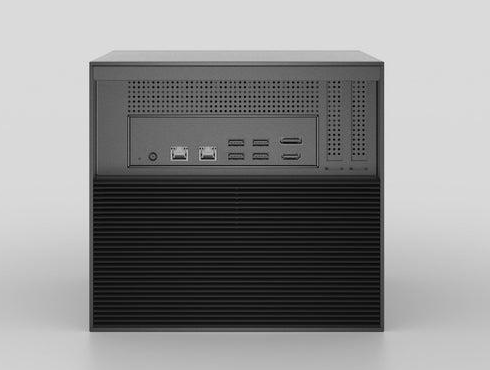
In today’s digital age, families and individuals accumulate vast collections of photos, videos, music, and documents scattered across multiple devices, external drives, and cloud services. This fragmentation creates frustration when you want to access a specific movie on your TV or share vacation photos with relatives. The solution lies in combining two powerful technologies: Plex Media Server and Network-Attached Storage (NAS) systems. Together, they transform chaos into an organized, accessible digital library that serves your entire household from a single location.
For tech-savvy homeowners building smart home ecosystems, this integration offers more than simple storage. A Plex-NAS setup provides centralized control over all your media, enables streaming to any device anywhere, and integrates seamlessly with automation routines. Whether you’re watching movies in your living room, accessing music through voice commands, or backing up precious memories, this powerful combination delivers reliability and convenience that cloud-only solutions struggle to match.
Understanding Plex Media Server and NAS Systems: The Foundation
Plex Media Server functions as a sophisticated media organization and streaming platform that transforms your digital content into a Netflix-like experience. It catalogs your movies, TV shows, music, and photos, automatically fetching cover art, descriptions, and metadata to create an elegant browsing interface accessible from virtually any device. The server software runs continuously on a host machine, transcoding video formats on-the-fly to ensure smooth playback regardless of whether you’re watching on a smart TV, tablet, or smartphone.


Network-Attached Storage systems serve as dedicated storage appliances connected directly to your home network. Unlike external hard drives that connect to individual computers, a NAS operates independently and remains accessible to all authorized devices simultaneously. These systems typically house multiple hard drives configured for redundancy, protecting your data against drive failures while offering storage capacities that can expand from terabytes to dozens of terabytes as your collection grows.
When paired together, Plex and NAS create a powerful synergy. The NAS provides reliable, always-available storage with data protection features, while Plex delivers the intelligence and accessibility layer that makes your content enjoyable to consume. This combination eliminates dependency on internet connections for local streaming, offers superior privacy compared to cloud services, and scales effortlessly as your media library expands. You gain complete ownership of your digital ecosystem with the flexibility to access content remotely through Plex’s secure relay services, effectively creating your personal streaming service without monthly subscription fees or storage limitations imposed by third-party platforms.
Integrating NAS with Home Automation for Tech-Savvy Individuals
Modern smart home ecosystems thrive on interconnected devices that respond intelligently to your routines, and your NAS can become a central player in this automation landscape. Most contemporary NAS systems offer robust API access and support for protocols like MQTT, WebDAV, and RESTful services that enable communication with popular automation platforms. By exposing your media library and NAS functions to home automation controllers, you create possibilities that extend far beyond simple file storage.
Practical applications emerge when you connect these systems thoughtfully. Imagine your morning routine triggering soft background music from your Plex library as smart lights gradually brighten, or motion sensors in your media room automatically launching a curated playlist when family members enter. Voice assistants can query your NAS-hosted photo library to display vacation pictures on smart displays, while presence detection can pause media playback across all devices when everyone leaves home. Integration with smart speakers allows voice commands to control Plex playback directly, and scheduled automation can trigger media backups during off-peak hours without manual intervention.
Step-by-Step Guide to NAS and Home Automation Setup
Begin by enabling your NAS’s web services and API access through its control panel, typically found under application settings or developer options. Install home automation software like Home Assistant or Node-RED on your NAS itself or a dedicated hub, then add the Plex integration through the platform’s add-on repository. Configure authentication tokens by generating API keys from both your NAS admin interface and Plex account settings. Connect IoT devices to the same network segment, ensuring your router allows device-to-device communication rather than isolating clients. Test basic commands by creating simple automations—like triggering a Plex scan when new files appear in watched folders—before building complex routines. If connections fail, verify firewall rules allow traffic on required ports and confirm your NAS firmware supports the automation protocols your platform requires.
Best Practices for Digital Asset Management with Plex
Organizing your media library properly from the start prevents countless headaches and ensures Plex correctly identifies your content. Create a clear folder hierarchy on your NAS with separate top-level directories for movies, TV shows, music, and photos. Within these categories, structure content according to Plex’s naming conventions: movies should reside in individual folders labeled “Movie Title (Year),” while TV shows require a parent folder containing season subfolders with episodes named using the format “Show Name – S01E01 – Episode Title.” This precision allows Plex’s metadata agents to accurately match your files with online databases, populating rich information like cast details, plot summaries, and artwork that transform your library into a professional-grade streaming service.
Security and backup strategies deserve equal attention to organization. Enable encryption on your NAS volumes to protect sensitive content, and configure user permissions that restrict access to specific libraries based on household members’ needs. Implement the 3-2-1 backup rule: maintain three copies of important data, store them on two different media types, and keep one copy offsite. Schedule automated backups of your Plex database and configuration files separately from media content, since rebuilding your carefully curated metadata proves far more tedious than replacing video files. For performance optimization, dedicate sufficient RAM to Plex transcoding tasks and store frequently accessed content on faster SSD caches if your NAS supports tiered storage. Monitor disk health through your NAS’s built-in tools, setting alerts for temperature spikes or SMART errors that signal impending drive failures. Finally, regularly update both Plex and your NAS firmware to benefit from performance improvements and security patches that protect your digital ecosystem from vulnerabilities.
See also: Discover the Best Tech Guitars with Detachable Neck
Comparing Cloud Storage Solutions and NAS for Media Management
Cloud storage services like Google Drive, Dropbox, and dedicated media platforms offer undeniable convenience with automatic synchronization and accessibility from anywhere with internet connectivity. However, they come with significant limitations for serious media collectors. Monthly subscription costs escalate quickly as your library grows beyond free tiers, often reaching hundreds of dollars annually for multi-terabyte storage. Upload speeds bottleneck your ability to add large video files, and streaming quality depends entirely on your internet connection’s reliability and bandwidth. Perhaps most critically, you surrender control over your content to third-party terms of service that can change arbitrarily, with providers reserving rights to scan files or restrict certain content types.
NAS systems require higher upfront investment but deliver superior long-term value and control. You own the hardware outright with no recurring fees beyond electricity costs, and expansion happens through affordable hard drive purchases rather than subscription tier upgrades. Local network streaming operates at gigabit speeds unaffected by internet outages, while privacy remains absolute since your content never leaves your premises unless you explicitly enable remote access. When selecting a NAS for your Plex setup, consider options from manufacturers like Zima that design systems specifically optimized for media server workloads, offering features such as hardware transcoding support and energy-efficient processors. The learning curve proves steeper than cloud services, requiring initial configuration and occasional maintenance, but this complexity translates into customization possibilities that cloud platforms cannot match.
The optimal approach for many households combines both technologies strategically. Use your NAS as the primary repository for your complete media library, ensuring fast local access and full control, while selectively syncing essential content to cloud storage for redundancy and emergency access. Configure Plex to stream from your NAS when you’re home and switch to cloud-stored copies during travel if remote access through Plex’s relay proves insufficient. This hybrid model balances the cost-effectiveness and control of NAS with the convenience and disaster recovery benefits of cloud storage, creating a resilient digital asset management system that adapts to varying access scenarios without compromising on either performance or security.
Building Your Personal Media Ecosystem
Combining Plex Media Server with a NAS system transforms fragmented digital collections into a unified, professional-grade media ecosystem that rivals commercial streaming services. This powerful integration delivers centralized control over your movies, music, photos, and documents while providing reliable access across all devices without recurring subscription fees or storage limitations. For tech-savvy homeowners, the benefits extend beyond simple organization—seamless smart home automation integration enables voice-controlled playback, routine-triggered media experiences, and intelligent backup systems that protect your digital memories.
The initial setup requires thoughtful planning and configuration, but the long-term rewards justify the investment. By implementing proper folder structures, security measures, and strategic backup approaches, you create a resilient digital asset management system that scales with your growing library. Whether you choose pure NAS storage for maximum control or hybrid cloud integration for added redundancy, the foundation remains the same: ownership, privacy, and flexibility that third-party services cannot match. Start small with your most-used media collections, apply the best practices outlined here, and gradually expand your system as you discover the convenience of having your entire digital world accessible from a single, secure location. Your future self will thank you for taking control of your digital assets today.